
Cases Where the Same Podcast Is Released at Different Lengths on Audio Apps and Video Platforms
The same podcast episode may show different runtimes on Spotify, Apple Podcasts, and YouTube. The usual causes are separate edits, inserted ads, inaccurate metadata, or player settings. Encoding alone should not remove minutes from a correctly exported episode. Start by comparing the opening, closing, ad breaks, and interview sections. This shows whether the difference comes from the published content or only from the app’s displayed clock.
Technical Reasons Behind Podcast Duration Discrepancies Across Audio Apps
Runtime differences can appear before publication, during ad delivery, or inside the podcast player. A fixed gap of several minutes usually points to different edits. A gap that changes between listeners may be caused by dynamic advertising.
Dynamic Ad Insertion (DAI) Technology: Dynamic ads are generally inserted by a podcast host, publisher, or advertising system rather than by Apple Podcasts itself. Spotify uses Streaming Ad Insertion for eligible ads. Megaphone also lets publishers mark pre-roll, mid-roll, and post-roll positions inside an episode. One listener may receive a filled ad slot while another hears a different ad or no ad. The delivered audio can therefore be longer than the original master file. Targeting rules vary between advertising providers. Location, age, and listening history should not be presented as universal targeting inputs.
Silence Removal & Smart Speed Algorithms: Apple Podcasts and Spotify offer playback-speed controls, but neither service documents automatic silence removal for every episode. Some third-party players offer optional pause trimming. Pocket Casts, for example, lets users enable Trim Silence and adjusts the remaining listening time when playback effects are active. This can shorten a listening session without changing the podcast file. Check the player’s speed and silence settings before assuming that another version was uploaded.
Frame Rate and Bitrate Encoding Variance: Bitrate affects file size and quality. With a correct export, bitrate, sample rate, and frame rate should not create a two-to-five-second runtime difference across a one-hour episode. A discrepancy can occur when an export is incomplete or when the audio and video tracks have different starting or ending points. Spotify warns that inconsistent track timing can cause processing or synchronization problems. It also recommends keeping the source video’s native frame rate.
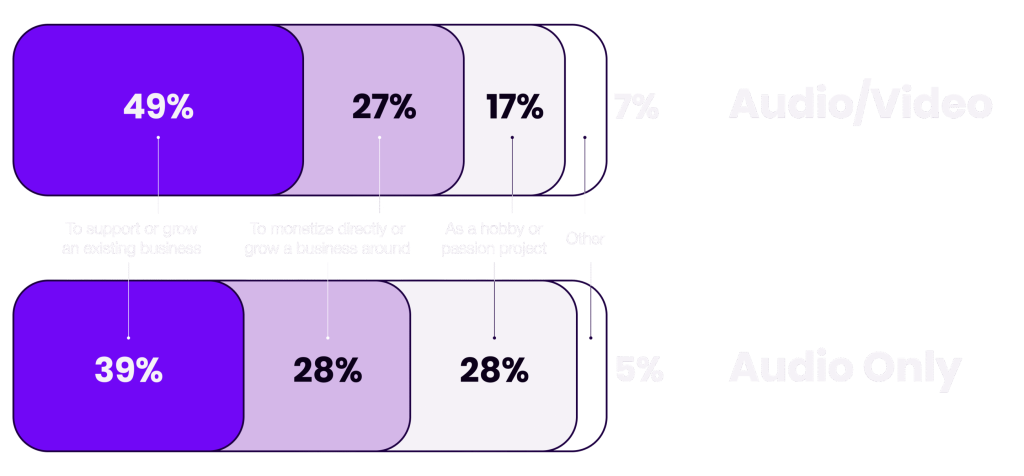
Full-Length vs. Condensed Podcast Releases: When to Use Which?
There is no rule that video podcasts must be full-length while audio versions must be shorter.
Long interviews can work well in audio. Tightly edited programs can also perform well on YouTube. Choose the format according to the episode, production goals, and audience data.
Full-Length Version:
- Ideal Platforms: YouTube podcast playlists, Spotify video, Apple Podcasts video, and paid membership feeds.
- Rationale: Keep the full version when facial reactions, demonstrations, screen shares, or the complete conversation add value.
YouTube advises creators to include full episodes in podcast playlists and keep clips or supporting content separate.
Using the same editorial sequence across platforms also keeps timestamps, show notes, sponsorship positions, and listener discussions aligned.
A full-length version does not have to include every mistake, equipment adjustment, or private discussion. It should still receive normal editorial review before publication.
Condensed Audio Version:
- Ideal Platforms: Standard RSS audio feeds when the producer intentionally creates a separate audio edit.
- Rationale: Remove visual-only instructions, long camera resets, unsuccessful demonstrations, and sections that make little sense without the screen.
A condensed version may also remove repeated answers, technical interruptions, or lengthy pauses that do not contribute to the discussion.
Do not shorten an episode only because audio listeners are assumed to have less patience. Review completion rates, drop-off points, and direct listener feedback.
Label the release as an “edited audio version” when meaningful content has been removed. This prevents confusion when listeners compare it with the video edition.
Step-by-Step Guide to Creating Short Video Teasers to Funnel Social Media Audiences
A teaser should make one clear promise and lead viewers to the matching episode. It should not remove context from a quote or misrepresent a guest’s position simply to create a more dramatic opening.
- Step 1 – Isolate the “Hook” (First 3 Seconds): Open with a strong statement, question, disagreement, or useful takeaway. TikTok’s creative guidance treats the first three to six seconds as an important opening window. This is a production guideline, not a guaranteed performance formula. Avoid introductions such as the show logo, a long music sting, or an explanation of what viewers are about to see.
- Step 2 – 9:16 Vertical Optimization: Reframe the speaker for a vertical screen and keep faces, captions, and logos inside safe areas. TikTok recommends a 9:16 format for vertical placements. Spotify also recommends vertical video for its Clips feature. Review automatic crops before publishing. Speaker changes, hand gestures, props, and screen shares can confuse face-tracking software.
- Step 3 – Dynamic Captions: Add accurate captions for accessibility and for viewers who cannot use audio. The claim that 80% of short-form viewers always watch with sound off has no reliable universal source and should not be used. Use readable contrast, short lines, correct names, and careful timing. Avoid oversized animated words that cover the speaker’s face or distract from the discussion. Automatic captions should always be checked manually, especially when an episode contains technical terms, brand names, or speakers with similar voices.
- Step 4 – Strategic Call to Action (CTA): End with one clear action, such as “Watch the full interview on YouTube” or “Listen to Episode 42.” Name the episode and place the link where the platform allows it. A vague message such as “Link in bio” is less useful when several links appear on the profile.
Technical Pitfalls and Barriers When Uploading Video Podcasts to Apple Podcasts and Spotify
Apple Podcasts, Spotify, and YouTube use different delivery systems. A file that works on one service may still require another feed, container, codec, or hosting workflow elsewhere.
- Apple Podcasts Constraints: Apple now recommends HLS video delivered through participating podcast hosting providers. Standard RSS video remains available, with MOV, MP4, and M4V among the supported file types. RSS video may use a dedicated feed, while HLS can place audio and video on the same show page. Apple does not publish a universal rule stating that videos longer than 60 minutes or 4K files are routinely rejected. Creators should follow their hosting provider’s upload limits, validate the podcast feed, and test playback before release.
- File Size & Bitrate Limits: The suggested 1080p H.264 bitrate of 5–8 Mbps is not an Apple-wide requirement. HLS specifications and available workflows vary by hosting provider. For RSS delivery, the host must serve the media enclosure correctly and support streaming requests. A 1080p H.264 export may be practical when 4K adds little value. That is a production decision rather than a mandatory Apple Podcasts setting.
- Spotify for Creators Constraints: Spotify supports MOV and MP4 video uploads. Its current guidance requires one video track and one audio track, limits files to 12 hours, and recommends H.264 video, a 16:9 aspect ratio, the native frame rate, and AAC-LC audio. Spotify video remains available on Spotify. When a Spotify-hosted show is distributed to other podcast apps, those services receive the audio version. The audio must therefore make sense without the picture. Visual demonstrations should be described, edited, or removed from the audio edition. Spotify does not document a universal 0.5-second synchronization threshold or an automatic quality downgrade at that point. Its documentation instead warns that unequal track lengths or inconsistent timing can cause processing and synchronization problems.
Using AI Tools to Speed Up Podcast Repurposing
Editing tools can reduce repetitive review work, but the 9.9-minute “golden rule” and the claimed 41% reduction in cognitive load have no verified basis.
These figures should not appear in a factual article.
- Automated Highlight Detection: OpusClip and Descript can suggest segments, reframe speakers, generate captions, and create editable clip drafts. These are product capabilities, not proof that every selected clip will attract viewers or send traffic to the full episode. Review the context, subtitle spelling, framing, music rights, and opening line before approving a generated clip. A high automated “viral score” should not replace editorial judgment. A clip must still represent the conversation accurately.
- Choosing the Right Summary Length: There is no universal 9.9-minute attention window. Set the length according to the purpose of the content and the limits of the destination platform. Spotify Clips must be between 15 and 90 seconds. Eligible square or vertical YouTube Shorts can run for up to three minutes. A longer summary can work as a separate YouTube video or bonus podcast episode, but it should not be presented as an evidence-based universal format.
- Measure Actual Time Saved: Do not publish an invented 41% figure. Track review hours, clips approved, correction time, completion rates, and clicks from each teaser to the full episode. These figures show whether automation saves production time or creates additional cleanup.
Different podcast runtimes are not always mistakes, but they are not automatically part of a content strategy. Check the published edit first. Then review dynamic ads, RSS metadata, player settings, and audio-video track timing. Use one core master when listeners and viewers should receive the same discussion. When the audio and video editions differ, label them clearly and explain what was removed. Follow current platform specifications instead of relying on fixed bitrate myths, undocumented synchronization thresholds, or unsupported audience statistics.